The objective remains the same: to allow the construction of richer, more flexible, and more brand-universe-adapted pages, without complicating usability. This update therefore brings both new tools, improvements to existing blocks, and several corrections.
8 new blocks to enrich your pages
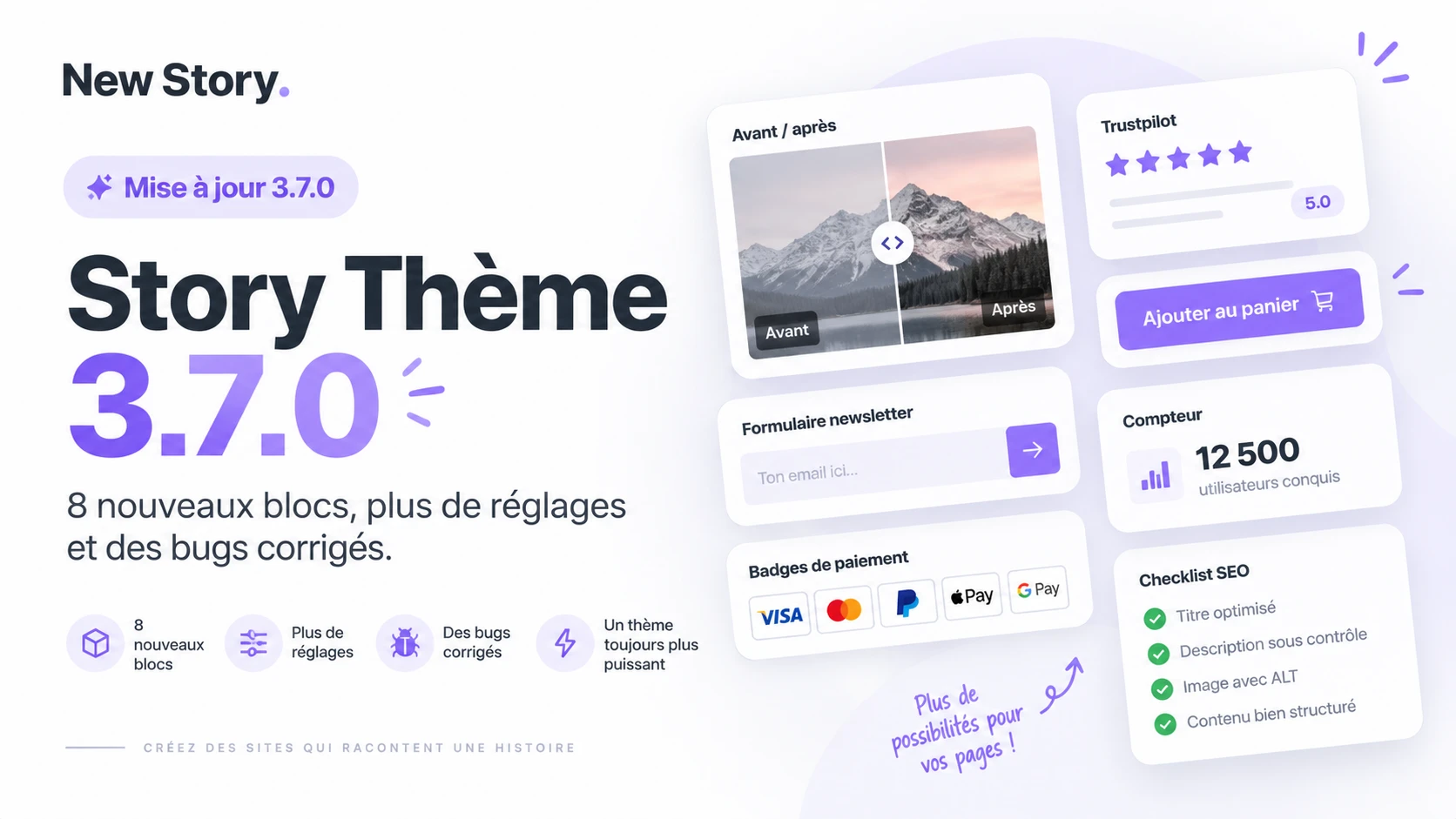
The big news in Story Theme 3.7.0 is eight new blocks available in the advanced custom section. They can be used alone or nested in a group, with their animations and the option to hide them on mobile.
These new blocks cover several important needs: social proof, visual comparison, content animation, reassurance, email collection, sharing, illustration, and highlighting numbers.
Trustpilot Block
The Trustpilot block allows you to display your rating and stars wherever you choose on a page. You can thus integrate this social proof directly into a composition, instead of limiting it to a fixed area.
This is particularly useful for reassuring visitors when they discover a product, an offer, or an important argument. The rating can complement your content without breaking the flow of the page.
Before / After Block
The new Before / After block adds an image comparator. It allows you to visually show a difference between two states and lets the visitor compare the two visuals directly on the page.
This type of presentation can be used to illustrate a result, a transformation, an evolution, or simply two variants of the same element. The content becomes more demonstrative and interactive.
Scrolling Block
The Scrolling block allows you to add scrolling text or logos anywhere in your compositions. It brings movement to a page while highlighting information that needs to remain visible.
You can for example use it to scroll short messages, names, reassurance elements, or a series of logos, depending on the structure of your page.
Payment Badges
Payment badges can now be added just below your purchase button. They help reinforce reassurance as the visitor approaches the main action.
Their positioning directly under the button makes reading easier and avoids the need to create a separate area just to display these elements.
Newsletter Form
The Newsletter Form block allows you to integrate sign-up for your list directly into a section. It thus becomes easier to create a dedicated space for email collection within a custom composition.
This block can be integrated where it makes the most sense in your journey: after a presentation, in the middle of editorial content, or in a section specifically designed for sign-up.
Share Block
The Share block adds share buttons that you can place in your pages. This new feature offers more freedom to make content shareable without relying on a predefined location.
You can thus bring the share buttons closer to the relevant content and integrate them more naturally into the layout.
Icon Block
The Icon block allows you to add a simple visual to your compositions. It can serve to illustrate an idea, structure information, or provide a visual marker for a section.
This new block is particularly handy for pacing pages and accompanying short text without needing to use a full image.
Counter Block
The Counter block displays a rising number. It has been designed to highlight statistics, results, or various elements of social proof.
It can serve to draw attention to an important data point and give more presence to a key number in a composition.
Image to insert here: capture presenting Story Theme 3.7.0
ALT Text: Story Theme 3.7.0 and its 8 new blocks
Additional settings on existing blocks
Version 3.7.0 is not limited to new blocks. A good portion of existing blocks also gains new settings to offer more control over layout and final rendering.
All blocks now have a bottom spacing setting. You can thus adjust the distance between elements more precisely and better control the vertical rhythm of your compositions.
Group, image, button, and text
The Group block can now receive a background image. This allows you to place text over an image and build more visual compositions directly from the advanced custom section.
The Image block can become clickable. It also benefits from more rounded corners and a more precise width setting, to better adapt to the role it plays in the composition.
The Button block gains text formatting options as well as an adjustable style. The Text block, for its part, can now be displayed in a smaller size.
Lists, badges, notes, and accordions
The Bulleted List block now allows text formatting. You thus have more flexibility to prioritize or highlight certain information within a list.
The Badge block accepts a custom icon and its size can be adjusted. The Note block also allows you to modify the size of the stars and the text.
Accordions in the same group can be configured so that only one is open at a time. This option helps keep a page more compact when several dropdown contents are grouped together.
Add to Cart Button
The add to cart button also benefits from a new setting: its colors become customizable. It can thus better integrate into the visual direction chosen for the page.
This evolution fits into the overall logic of version 3.7.0: to give more control over details without burdening the construction of sections.
Several bugs fixed
This update also brings two targeted corrections. Accordions now maintain their width regardless of the alignment of the group in which they are placed.
A display bug on the password page has also been fixed. These adjustments help stabilize the experience alongside the new features.
Story Theme continues to grow
With recent versions, the foundations of the advanced custom section are now in place. The next phase of development will go further, with the preparation of a brand new version of the theme.
This future evolution is set to mark a new turning point in the history of Story Theme. The roadmap allows for more precise tracking of the next steps and planned developments.
You can check all the details on the dedicated roadmap page: www.story-theme.com/roadmap
How to upgrade to Story Theme 3.7.0?
If you are already using Story Theme, the update can be done from your member area. Go to the “Update” page to retrieve the new version and enjoy the new blocks, settings, and corrections.
If you have not yet discovered Story Theme, this update is also an opportunity to explore the possibilities offered by the advanced custom section and to test the new tools available.
Version 3.7.0 thus continues the work initiated with 3.6.0: more freedom in compositions, more settings on blocks, and new ways to present, reassure, and structure your content.